Self-hosted IPAM and DCIM.
One source of truth.
Asano puts IP address management and data centre infrastructure management in one self-hosted platform — addresses, subnets, VLANs, VRFs and tenants alongside sites, racks, assets and end-to-end patching. The record of your estate becomes the thing your team works from.
Runs anywhere
One Docker container — bare metal, your own VM or any cloud
10 minutes
From docker compose up to a live dashboard
Air-gapped
No phone-home — licences verify offline
7 days
Full use of a new install before it needs a licence
Features
One platform for IPAM and DCIM
Everything an IPAM and a DCIM do, in one place — so the addresses, the racks and the cables between them stop living in three different spreadsheets.
Sites, rooms and racks
Sites, data rooms and racks in one hierarchy, with floorplans and occupancy for every location.
IP address management
IPs, subnets, VLANs, VRFs and tenants with live utilisation, and the next free address suggested for you.
Links and multi-hop patching
Record a connection end to end, through every patch panel hop — then see the whole path drawn out.
Topology view
An interactive map of what connects to what, drawn from the links you have already recorded.
Per-port faceplates
Switches, routers and firewalls drawn port by port at real connector proportions, down to stacks and chassis.
Site Survey wizard
Capture a whole location in one pass — site, rooms, floorplan, racks and contents — built for the walk-round.
Naming and numbering
Define how hostnames, asset tags and links are built — Asano generates them, and flags anything that drifts.
Live dashboard
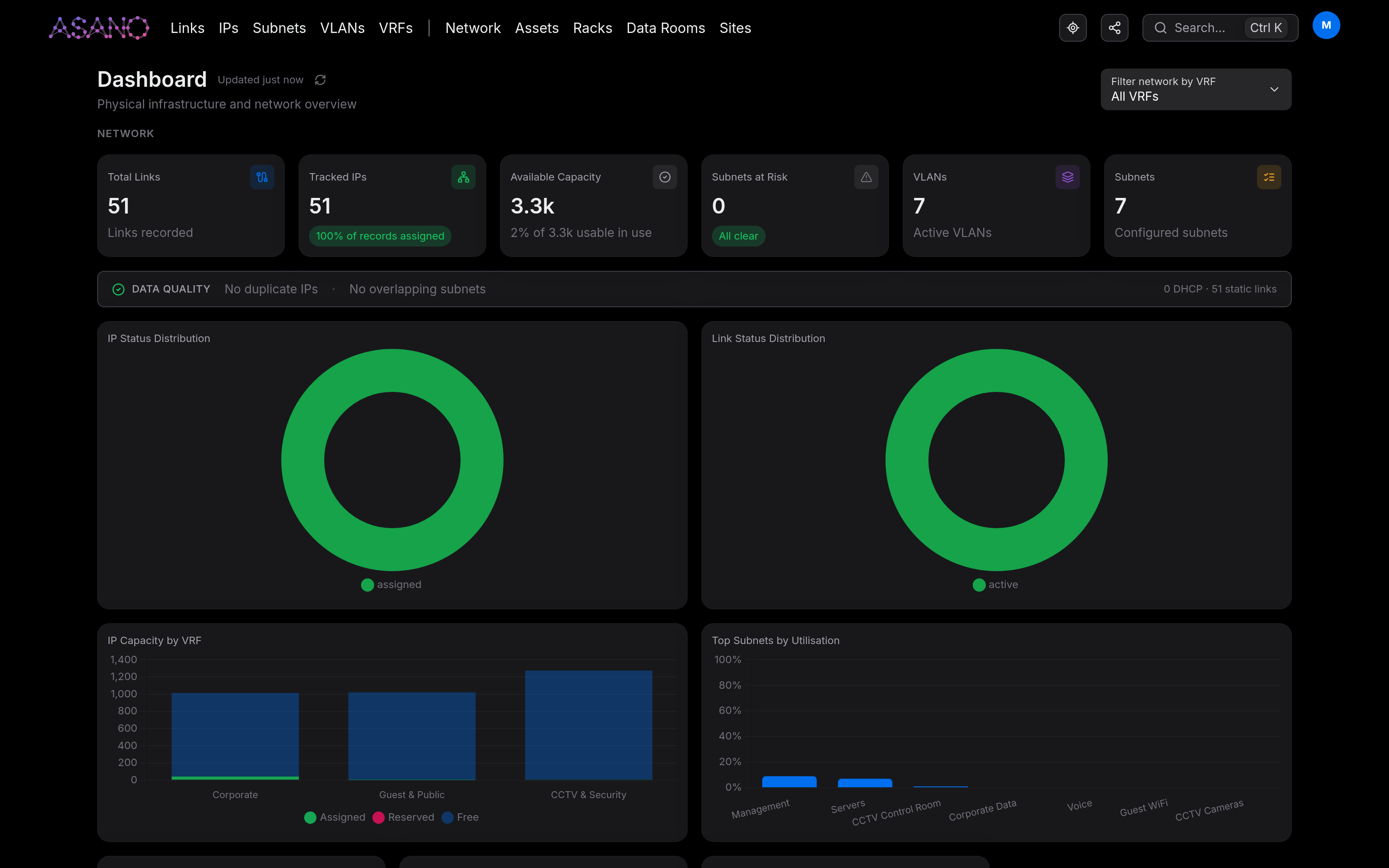
Rack utilisation, IP capacity, circuit status and top subnets by usage — live, with PDF exports for reporting.
ServiceNow integration
Import sites, assets and services from your CMDB, choosing what comes across — and push changes back.
SSO and access control
Local accounts plus Microsoft Entra ID, Google Workspace, Okta or GitHub, set up from Settings.
Admin mode
Irreversible actions need admin mode as well as an admin account — a deliberate switch that turns itself off.
Audit log
Every create, update and delete across the app, with what changed and who changed it — including when admin mode was turned on, and why.
How it works
Up and running in three steps
Deploy in minutes
Pull the Docker image and run docker compose up. PostgreSQL comes with it and the secret key generates itself on first boot, so .env is optional — it is where you go to set your own domain, or point Asano at a cluster you already run.
docker compose up -dConnect your data
Run the Site Survey wizard to capture a location in one pass, or connect your ServiceNow CMDB from the Settings screen and import sites, assets and services. Either way the record lives in your own Asano database — an import fills it, and write-back keeps ServiceNow in step with it.
Settings → IntegrationsGet full visibility
Live dashboards show rack utilisation, IP capacity, circuit status and risk alerts the moment you sign in. Export PDF reports carrying your own security classification marking.
open https://your-domain.comQuestions
Before you deploy
How is Asano different from NetBox?
Both are self-hosted sources of truth for a network and data centre estate. Asano’s differences are in the walk-round and the wiring: a Site Survey wizard that captures a whole location in one pass — site, rooms, floorplan, racks and contents — multi-hop patching recorded through every panel and drawn out as a path, per-port faceplates at real connector proportions, and naming and numbering rules the app generates and then flags when they drift. If you are weighing up a NetBox alternative, those are the four to compare.
Can Asano run air-gapped?
Yes. Asano does not phone home, and licences verify offline against a public key compiled into the image, so no part of running or licensing it needs outbound access. The optional integrations do reach out when you turn them on — ServiceNow import and write-back, and single sign-on against Entra ID, Google Workspace, Okta or GitHub — so an air-gapped install simply runs on local accounts.
Does Asano handle patch panel documentation?
A link is recorded end to end, through every patch panel hop, and the whole path is drawn out for you. Panels appear as per-port faceplates at real connector proportions alongside switches, routers and firewalls, down to stacks and chassis — and the topology view maps what connects to what from the links you have already recorded.
Do I have to bring my own PostgreSQL?
No. PostgreSQL ships with the deployment, so docker compose up gives you a working database along with everything else. If you would rather run Asano against a cluster you already operate, that is the Enterprise option.
What does Asano cost?
Asano is in private beta and prices are not public yet. Licensing is annual and per installation, sized by how many people use it rather than by how big your estate is — every tier holds as many sites, racks and addresses as you have.
Private beta
Request access to the beta
Asano is in private beta. Every tier holds the whole estate — as many sites, racks and addresses as you have — and the tier just sets how many people work in it. Tell us which one fits your team and we'll add you to the waitlist.
Starter
Up to 5 users
A small team running one estate. Every core feature, local accounts, one deployment.
Join the waitlistIncludes
- Unlimited sites, data rooms, racks and assets
- IPs, subnets, VLANs, VRFs and tenants
- Links, multi-hop patching and topology
- Per-port faceplates, stacks and chassis
- Floorplans and the Site Survey wizard
- Live dashboard and PDF reports
- Audit log and admin mode
- Silver support
Professional
Up to 25 users
A department-sized team, with single sign-on and automated naming across the estate.
Join the waitlistIncludes
- Unlimited sites, data rooms, racks and assets
- IPs, subnets, VLANs, VRFs and tenants
- Links, multi-hop patching and topology
- Per-port faceplates, stacks and chassis
- Floorplans and the Site Survey wizard
- Live dashboard and PDF reports
- Audit log and admin mode
- SSO — Entra ID, Google, Okta, GitHub
- SSO group and app-role mapping to Admin
- Naming and numbering automation
- Gold support
Enterprise
Unlimited users
Multiple deployments, ServiceNow kept in step with your Asano database, and a support commitment behind it.
Talk to usIncludes
- Unlimited sites, data rooms, racks and assets
- IPs, subnets, VLANs, VRFs and tenants
- Links, multi-hop patching and topology
- Per-port faceplates, stacks and chassis
- Floorplans and the Site Survey wizard
- Live dashboard and PDF reports
- Audit log and admin mode
- Everything in Professional
- Bring your own PostgreSQL cluster
- ServiceNow CMDB import and write-back
- Multiple deployment instances
- Diamond support
- Custom onboarding
All tiers are self-hosted via Docker on your own infrastructure, with the bundled PostgreSQL database included. Enterprise can point Asano at a cluster you already run instead.
Partners and resellers
Coming soonSell Asano to your own customers
Built for managed service providers and telcos putting Asano in front of their own clients. Each customer gets their own deployment and their own licence, so their data stays theirs — and you hold the relationship, the support desk and the invoice. Not open yet; register interest and we'll reach out when the program launches.
Register interest- Volume licensing — tiered discount from ten deployments up
- You set the end price; the margin is yours
- Free not-for-resale licences for your labs and demos
- You run first-line support; we take it from second
- Named technical contact and a joint escalation path
- Deployment and onboarding runbooks you can put your name on
Ready to take control of your infrastructure?
Self-hosted, enterprise-grade, and running in under 10 minutes. No cloud lock-in. Your data stays on your infrastructure.